Managing your ingredient catalogue
This article covers the Ingredients page day to day.
Steps
Open Recipes, Ingredients. It opens read-only: name, pack cost, pack size, unit, cost per unit, stock, supplier and allergens. Search, sort by any column, and use Columns to hide ones you don't need.
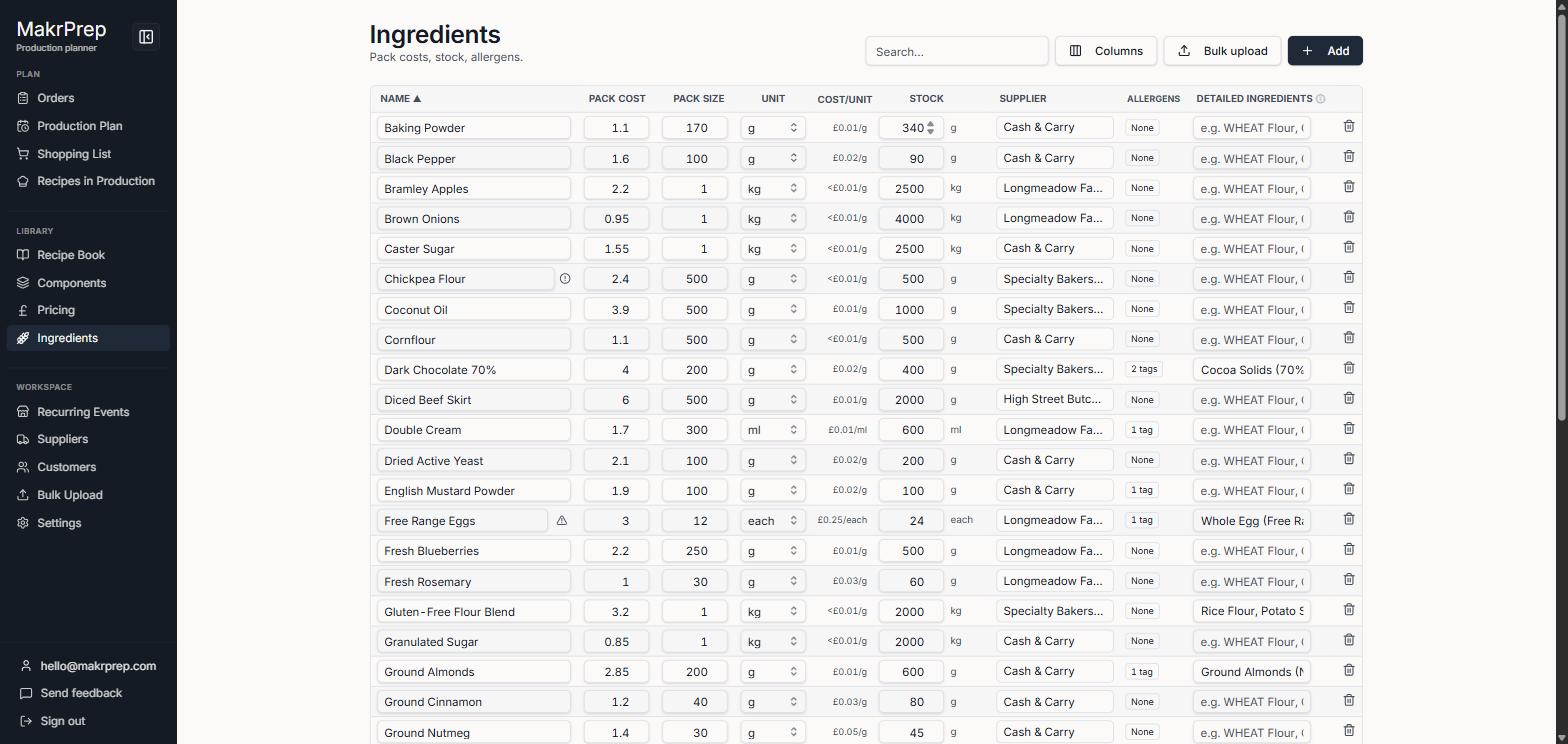
The Ingredients table read-only, with Edit prices and stock - To change prices, stock or anything else, click "Edit prices and stock". The table turns into boxes you can type in. Click "Done editing" when you've finished.
- When a supplier's price changes, update the pack cost. Every recipe cost updates, and Reports keeps a record of the change.
- Correct stock by typing the real amount in Stock. MakrPrep records the difference for you.
- For jars, bottles, labels and boxes, tick "Packaging (cost only, left off labels)" under the name while editing. Their cost still counts, but they're left off the ingredients list on labels. They show "packaging" next to the name.
- To delete an ingredient, use its bin button while editing.
- Tick "Not used in any recipe" to find ingredients you can tidy up.
What to expect
On a phone or a narrow window, the pack, unit, supplier and allergens fold into a line under each name, so cost per unit and stock stay on screen. Costs under a penny show as "<£0.01"; hover for the exact figure.
Common issues
- A name is rejected: each ingredient name can only be used once.