Splitting a batch into parts
This article helps you split one line on the Production plan into parts, each with its own status, for example when 60 of 100 pies are prepped and 40 are still in the oven.
Before you start
Have the line on your Production plan.
Steps
- On the Production plan, tap the line's status and choose "Split this line into parts" at the bottom of the list.
The line splits into two parts of about half each. Change the amount in each part to match what's actually happening, for example 60 and 40.
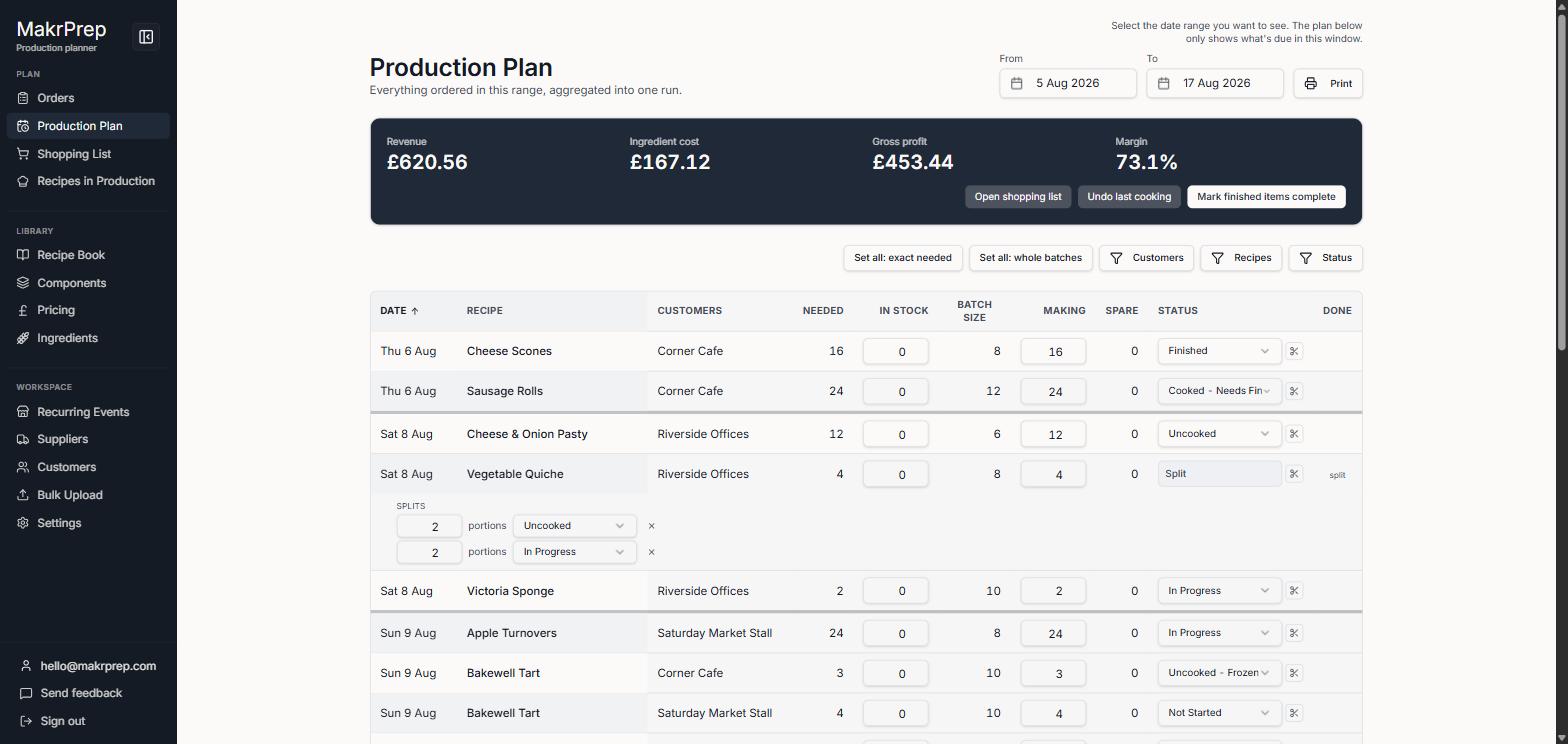
A split line opened, showing two parts with their amounts and statuses - Give each part its own status, for example 60 Making and 40 still To make. Want a status like Prepped? Add it in Settings, Pricing and orders, Production statuses.
- Need a third part? Click "Add a part". Remove one with its X.
- Close the parts by tapping the summary. The line now reads in words, for example "60 making, 40 to make". If every part has the same status, it says how many parts, for example "100 making, in 2 parts".
What to expect
Each part is finished on its own. When a part reaches a status that counts as finished, use the ⋯ button, "Take stock out for N lines marked done", to take its ingredients out of stock. The line's tick box fills once every part is done.
You can also use a split to spread one batch over two days of work. The parts stay on the line's date.
Common issues
- The parts don't add up: a red note under the number says "Parts add up to X, making Y". See "Why do my split parts not add up?"