Completing and reverting production
This article explains what happens when you mark something made, and how to undo it.
Steps
- The quickest way is the tick box on the Production plan. It takes the ingredients out of stock, adds any extra to made stock and moves the line to Completed.
On Recipes to prep you can also use "Mark complete" on a single line, or "Mark all complete" for everything on that recipe. These show once a line's status is one that counts as finished, like Done.
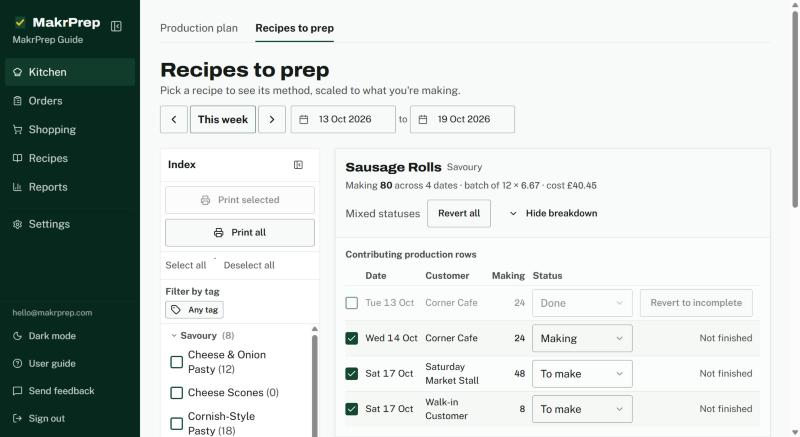
Recipes to prep with Mark complete and Mark all complete - Choosing a finished status from a line's status list does the same as ticking it. Choosing an unfinished status again puts the stock back.
- Split lines are finished part by part. If any parts are at a finished status but their stock hasn't been taken out, the ⋯ button on the plan shows "Take stock out for N lines marked done" to finish them in one go.
- To undo: untick the line on the plan, use "Revert to incomplete" on Recipes to prep, or use the ⋯ button, "Undo last cooking", to reverse the last batch you completed. In the Completed section, "Reopen all and put stock back" reopens every completed line in view.
What to expect
Undoing always puts the ingredients back into stock and takes back any extra that went into made stock. Components that were already prepped as a pooled batch aren't taken out of stock twice.